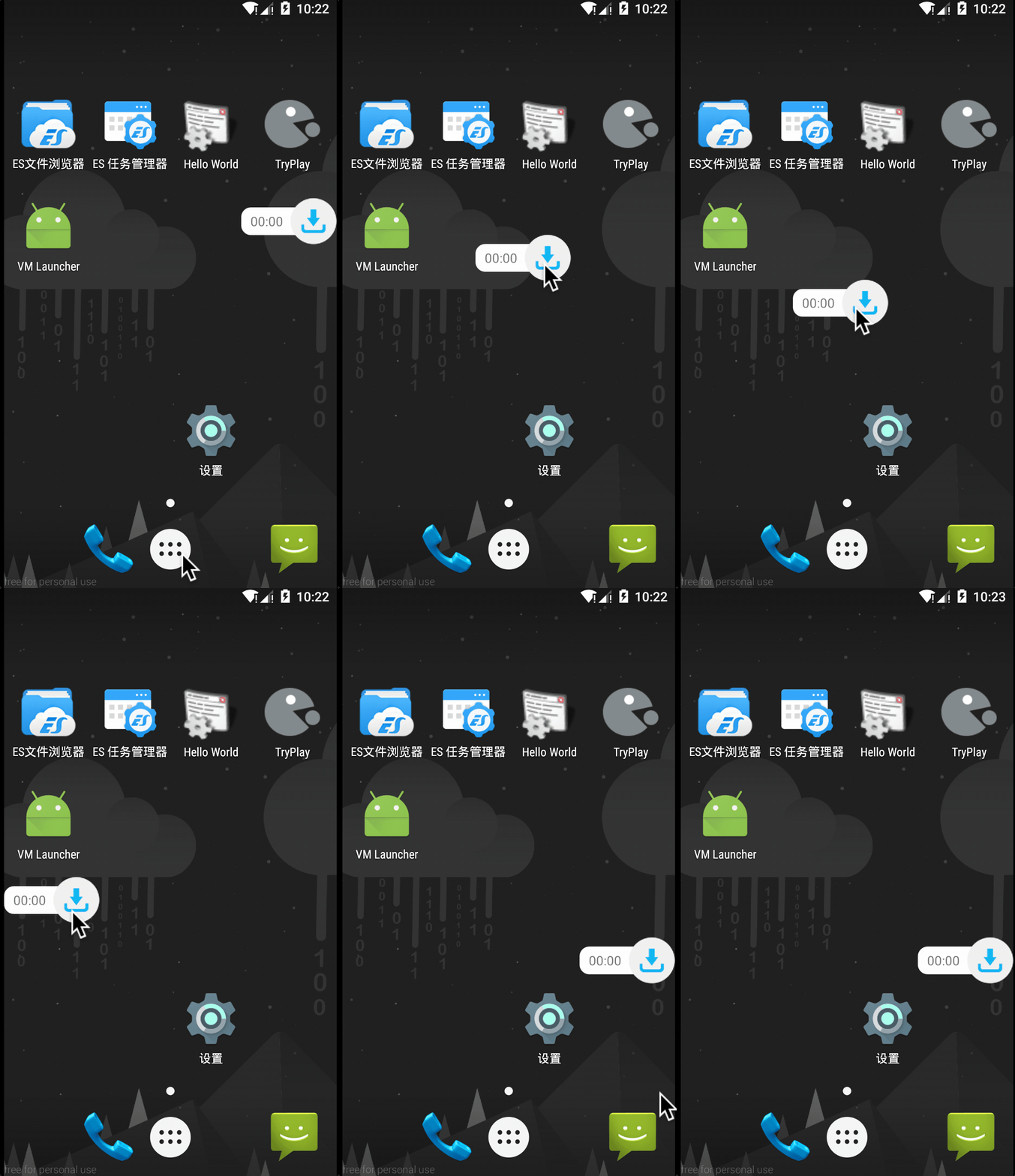
效果图如下:
package com.wangsu.tplibrary.ui;

import android.content.Context;
import android.graphics.PixelFormat;
import android.util.AttributeSet;
import android.view.Gravity;
import android.view.LayoutInflater;
import android.view.MotionEvent;
import android.view.View;
import android.view.WindowManager;
import android.widget.LinearLayout;

import com.sharezer.util.L;
import com.sharezer.util.ScreenUtils;
import com.wangsu.tplibrary.R;

/**
 * Created by sharezer on 2017/5/20.
 */

public class FloatView extends LinearLayout {

    private float mTouchX;
    private float mTouchY;
    private float x;
    private float y;
    private int startX;
    private int startY;
    private Context mContext;
    private int controlledSpace = 20;
    private int screenWidth;
    boolean isShow = false;
    View downloadView;
    private View.OnClickListener mClickListener;

    private WindowManager windowManager;

    private WindowManager.LayoutParams windowManagerParams = new WindowManager.LayoutParams();

    public FloatView(Context context, AttributeSet attrs) {
        super(context, attrs);
    }

    public FloatView(Context context) {
        super(context);
        mContext = context;
        initView(context);
    }

    // 初始化窗体
    public void initView(Context context) {
        windowManager = (WindowManager) context.getApplicationContext().getSystemService(Context.WINDOW_SERVICE);
        screenWidth = ScreenUtils.getScreenWidth(context);
        LayoutInflater.from(context).inflate(R.layout.view_float, this);
        downloadView = findViewById(R.id.btn_download);
        windowManagerParams.type = WindowManager.LayoutParams.TYPE_PHONE;
        windowManagerParams.format = PixelFormat.RGBA_8888; // 背景透明
        windowManagerParams.flags = WindowManager.LayoutParams.FLAG_NOT_TOUCH_MODAL
                | WindowManager.LayoutParams.FLAG_NOT_FOCUSABLE;
        // 调整悬浮窗口至左上角,便于调整坐标
        windowManagerParams.gravity = Gravity.LEFT | Gravity.TOP;
        // 以屏幕左上角为原点,设置x、y初始值
        windowManagerParams.x = screenWidth;
        windowManagerParams.y = 0;
        // 设置悬浮窗口长宽数据
        windowManagerParams.width = WindowManager.LayoutParams.WRAP_CONTENT;
        windowManagerParams.height = WindowManager.LayoutParams.WRAP_CONTENT;
//        this.setLayoutParams(windowManagerParams);
    }

    @Override
    public boolean onTouchEvent(MotionEvent event) {

        //获取到状态栏的高度
        int statusBarHeight = ScreenUtils.getStatusHeight(mContext);
        // 获取相对屏幕的坐标,悬浮窗口所在的位置
        x = event.getRawX();
        y = event.getRawY() - statusBarHeight;


        switch (event.getAction()) {
            case MotionEvent.ACTION_DOWN: {
                mTouchX = event.getX();
                mTouchY = event.getY();
                startX = (int) event.getRawX();
                startY = (int) event.getRawY();
                break;

            }
            case MotionEvent.ACTION_MOVE: {
                updateViewPosition();
                break;
            }
            case MotionEvent.ACTION_UP: {
//                if (Math.abs(x - startX) < controlledSpace && Math.abs(y - startY + statusBarHeight) < controlledSpace) {
//                    if (mClickListener != null) {
//                        mClickListener.onClick(this);
//                    }
//                }
                if(inRangeOfView(downloadView, event))
                {
                    if(mClickListener != null) mClickListener.onClick(this);
                }

                L.i("x=" + x + " startX+" + startX + " y=" + y + " startY=" + startY);
                if (x <= screenWidth / 2) {
                    x = 0;
                } else {
                    x = screenWidth;
                }
                updateViewPosition();

                break;
            }
        }

        return super.onTouchEvent(event);
    }

    private boolean inRangeOfView(View view, MotionEvent ev){
        int[] location = new int[2];
        view.getLocationInWindow(location);
        int x = location[0];
        int y = location[1];
        if(ev.getX() < x || ev.getX() > (x + view.getWidth()) || ev.getY() < y || ev.getY() > (y + view.getHeight())){
            return false;
        }
        return true;
    }

    // 隐藏该窗体
    public void hide() {
        if (isShow) {
            windowManager.removeView(this);
            isShow = false;
        }

    }

    // 显示该窗体
    public void show() {
        if (isShow == false) {
            windowManager.addView(this, windowManagerParams);
            isShow = true;
        }

    }

    public boolean isShow() {return isShow;}

    @Override
    public void setOnClickListener(OnClickListener l) {
        this.mClickListener = l;
    }

    private void updateViewPosition() {
        // 更新浮动窗口位置参数
        windowManagerParams.x = (int) (x - mTouchX);
        windowManagerParams.y = (int) (y - mTouchY);
        windowManager.updateViewLayout(this, windowManagerParams); // 刷新显示
    }
}
使用的时候
FloatView floatView = new FloatView(this); // 创建窗体
floatView.setOnClickListener(new View.OnClickListener() {
    @Override
    public void onClick(View v) {
        L.e("click");
    }
}); // 设置事件,你需要实现FloatView里的onclick接口
floatView.show(); // 显示该窗体
记得添加权限
<uses-permission android:name="android.permission.SYSTEM_ALERT_WINDOW" />


