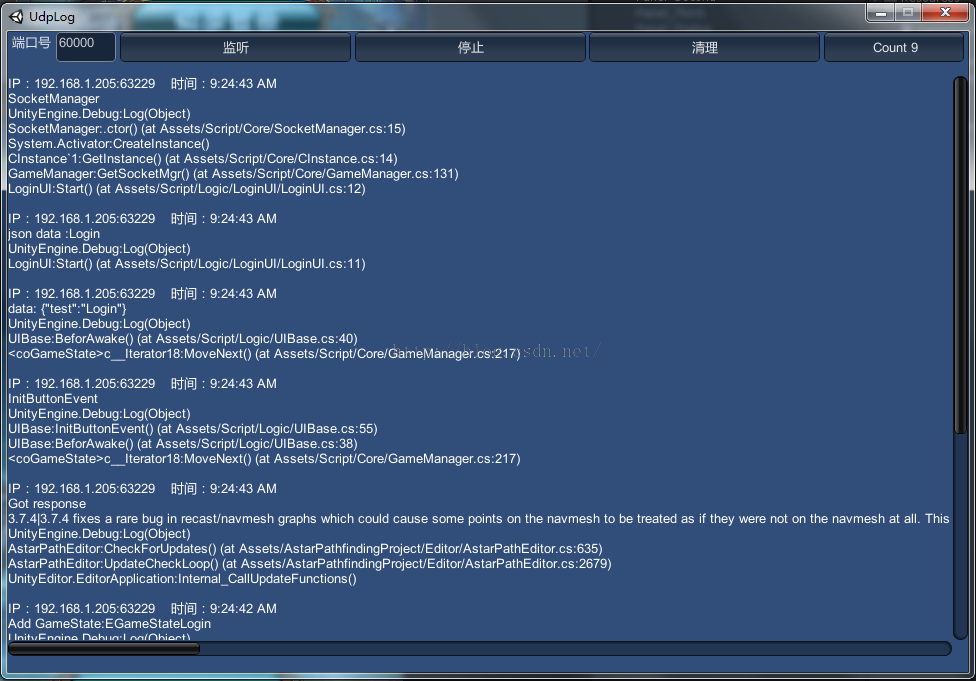
最初是用来在手机端直接显示Log到屏幕上,后来看到满屏幕Log实在有点恶心,所以就通过Udp,把手机端上的log,直接发送到电脑端上的接收器。同时还可以进入多个手机设备同时进行LOG调试。
首先创建一个脚本OutLog.cs
using UnityEngine;
using System.Collections;
using System.Collections.Generic;
using System.IO;

using System;
using System.Text;
using System.Collections;
using System.Net;
using System.Net.Sockets;

public class OutLog : MonoBehaviour
{
    static List<string> mLines = new List<string>();
    static List<string> mWriteTxt = new List<string>();
    private string outpath;

    //屏幕打印最多Log数量
    public int _screenLogMaxCount = 8;
    public bool _isInputLogOnScreen = false;
    public Color _color = Color.red;

    public string ip = "127.0.0.1";
    public int point = 60000;

    private UdpClient udpClient;
    private IPEndPoint iPEndPoint;

    void Awake() {
        iPEndPoint = new IPEndPoint(IPAddress.Parse(ip), point);
        udpClient = new UdpClient();

        //Application.persistentDataPath Unity中只有这个路径是既可以读也可以写的。
        outpath = Application.persistentDataPath + "/outLog.txt";
        Debug.Log("path:" + outpath);
        //每次启动客户端删除之前保存的Log
        if (System.IO.File.Exists(outpath)) {
            File.Delete(outpath);
        }
        //在这里做一个Log的监听
        Application.RegisterLogCallback(HandleLog);
    }

    void Update() {
        if (mWriteTxt.Count > 0) {
            string[] temp = mWriteTxt.ToArray();
            foreach (string t in temp) {
                using (StreamWriter writer = new StreamWriter(outpath, true, Encoding.UTF8)) {
                    writer.WriteLine(t);
                }
                mWriteTxt.Remove(t);
            }
        }
    }

    void HandleLog(string logString, string stackTrace, LogType type) {
        mWriteTxt.Add(logString);
        if (type == LogType.Log || type == LogType.Error || type == LogType.Exception) {
            Log(logString);
            //Log(stackTrace);
        }

        try {
            byte[] bytes;
            //bytes = Encoding.UTF8.GetBytes(type.ToString() + "n " + logString + "n" + stackTrace);
            bytes = Encoding.UTF8.GetBytes(logString + "n" + stackTrace);
            udpClient.Send(bytes, bytes.Length, iPEndPoint);

        } catch (System.Exception) {

        }
    }

    //输出在手机屏幕上
    public void Log(params object[] objs) {
        string text = "";
        for (int i = 0; i < objs.Length; ++i) {
            if (i == 0) {
                text += objs[i].ToString();
            } else {
                text += ", " + objs[i].ToString();
            }
        }
        if (Application.isPlaying) {
            if (mLines.Count > _screenLogMaxCount) {
                mLines.RemoveAt(0);
            }
            mLines.Add(text);

        }
    }

    void OnGUI() {
        if (_isInputLogOnScreen) {
            GUI.color = _color;

            int count = 0;
            for (int i = mLines.Count - 1; i >= 0 && count < _screenLogMaxCount; --i) {
                count++;
                GUILayout.Label(mLines[i]);
            }
        }
    }
}
再将OutLog.cs绑定在手机端任意GameObject上
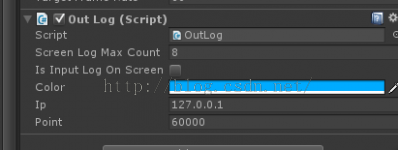
Screen Log Mac Count :屏幕同时显示的最多Log数
Is Input Log On Screen:是否在屏幕显示Log
Color:屏幕显示Log颜色
IP :接收端的IP地址
Point : 接收端的端口号
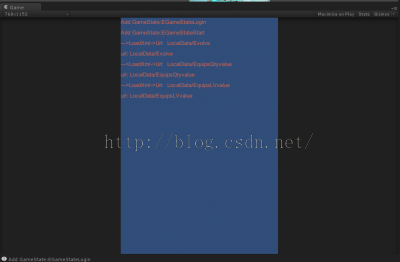
效果如下:
然后网上百度一下网络调试工具,就可以找到一些UDP的调试工具了。
或者自己写一个也可以。
以下是我用Unity写的UDP的服务器,用于接收Log信息:
using UnityEngine;
using System.Collections;
using System.Collections.Generic;

using System.Threading;
using System;
using System.Text;
using System.Net;
using System.Net.Sockets;
public class UdpServer : MonoBehaviour
{
    public int _point = 60000;
    Thread _thread = null;

    private Socket newsock;//定义一个socket变量
    IPEndPoint ip;//定义一个IP地址和端口号
    int recv;//定义一个接受值的变量
    byte[] data;//定义一个二进制的数组用来获取客户端发过来的数据包

    List<string> _dataList;

    void Start() {
        Loom.Initialize();
        _dataList = new List<string>();

        _labelStyle = new GUIStyle();
        Screen.SetResolution(960, 640, false);


        //得到本机IP,设置TCP端口号
        ip = new IPEndPoint(IPAddress.Any, _point);//设置自身的IP和端口号,在这里IPAddress.Any是自动获取本机IP
        newsock = new Socket(AddressFamily.InterNetwork, SocketType.Dgram, ProtocolType.Udp);//实例化socket对象设置寻址方案为internetwork(IP版本的4存放),设置Soket的类型,为Dgram(支持数据报形式的数据),设置协议的类型,为UDP
        newsock.SendTimeout = 5000;
        newsock.ReceiveTimeout = 5000;

        //绑定网络地址
        newsock.Bind(ip);//绑定IP
        Debug.Log("This is a Server,host name is " + Dns.GetHostName());//输出本地的名字
        Debug.Log("Waiting for a client");
        //BeginReceives();
        _thread = new Thread(BeginListening);//定义一个子线程
        _thread.Start();//子线程开始
    }

    void BeginListening() {
        IPEndPoint sender = new IPEndPoint(IPAddress.Any, 0);//实例化一个网络端点,设置为IPAddress.Any为自动获取跟我通讯的IP,0代表所有的地址都可以
        EndPoint Remote = (EndPoint)(sender);//实例化一个地址结束点来标识网络路径
        //  Debug.Log(Encoding.ASCII.GetString(data, 0, recv));//输出二进制转换为string类型用来测试
        while (true) {
            if (newsock.Available == 0) {
                System.Threading.Thread.Sleep(200);
                continue;
            }

            int bufferSize = newsock.Available;
            if(bufferSize > 3000){
                bufferSize *= 3;
            }
            //Debug.Log("buff size " + bufferSize);
            data = new byte[25000];
            recv = newsock.ReceiveFrom(data, ref Remote);//将数据包接收到的数据放入缓存点,并存储终节点
            //Debug.Log(Encoding.ASCII.GetString(data, 0, recv));
            string str = "IP:" + Remote.ToString() + "    时间:" + DateTime.Now.ToLongTimeString().ToString() + "n" + Encoding.Default.GetString(data, 0, recv);
            Loom.QueueOnMainThread(() => {
                _dataList.Add(str);
            });
            // newsock.SendTo(Encoding.ASCII.GetBytes(mydata),mydata.Length,SocketFlags.None,Remote);

        }
    }

    void SendMessage(string message) {
        byte[] data = new byte[1024];
        Debug.Log("This is a client,host name is" + Dns.GetHostName());
        //IPEndPoint sender = new IPEndPoint(IPAddress.Any, 0);//实例化一个网络端点,设置为IPAddress.Any为自动获取跟我通讯的IP,0代表所有的地址都可以
        EndPoint Remote = (EndPoint)(ip);//实例化一个地址结束点来标识网络路径
        Socket server = new Socket(AddressFamily.InterNetwork, SocketType.Dgram, ProtocolType.Udp);

        //string welcome = "你好";
        //data = Encoding.ASCII.GetBytes(welcome);
        ip = new IPEndPoint(IPAddress.Parse("192.168.1.120"), 12346);
        // server.SendTo(data, data.Length, SocketFlags.None, ip);
        // data = new byte[1024];
        server.SendTo(Encoding.ASCII.GetBytes(message), ip);
        // data = new byte[1024];
        Debug.Log("Stopping Client.");
        server.Close();
    }

    Vector2 startScrollPos = Vector2.zero;
    float buttonHight = 30.0f;
    GUIStyle _labelStyle;
    void OnGUI() {

        GUILayout.BeginHorizontal();
        GUILayout.Label("端口号", GUILayout.Width(40), GUILayout.Height(buttonHight));
        _point = int.Parse(GUILayout.TextField(_point.ToString(), GUILayout.Width(60), GUILayout.Height(buttonHight)));

        if (GUILayout.Button("监听", GUILayout.Height(buttonHight))) {
            StopListening();

            //得到本机IP,设置TCP端口号
            ip = new IPEndPoint(IPAddress.Any, _point);//设置自身的IP和端口号,在这里IPAddress.Any是自动获取本机IP
            newsock = new Socket(AddressFamily.InterNetwork, SocketType.Dgram, ProtocolType.Udp);//实例化socket对象设置寻址方案为internetwork(IP版本的4存放),设置Soket的类型,为Dgram(支持数据报形式的数据),设置协议的类型,为UDP

            //绑定网络地址
            newsock.Bind(ip);//绑定IP

            Debug.Log("This is a Server,host name is " + Dns.GetHostName());//输出本地的名字
            Debug.Log("Waiting for a client");
            //BeginReceives();

            _thread = new Thread(BeginListening);
            _thread.Start();
        }

        if (GUILayout.Button("停止", GUILayout.Height(buttonHight))) {
            StopListening();
        }

        if (GUILayout.Button("清理", GUILayout.Height(buttonHight))) {
            _dataList.Clear();
        }

        if (GUILayout.Button("Count " + _dataList.Count, GUILayout.Height(buttonHight), GUILayout.Width(140))) {
        }

        GUILayout.EndHorizontal();

        GUILayout.Space(10);

        startScrollPos = GUILayout.BeginScrollView(startScrollPos, GUILayout.Width(Screen.width), GUILayout.Height(Screen.height - 2 * buttonHight));
        //labelStyle.fontSize = 20;
        for (int i = _dataList.Count; i > 0; i--) {
            //Color lableColor =
            string str = _dataList[i - 1];
            if (str == "" || str == null || str.Length < 1)
                continue;

            if (str.Contains("Debug:LogError(Object)")) {
                _labelStyle.normal.textColor = Color.red;
            } else if (str.Contains("Debug:LogWarning(Object)")) {
                _labelStyle.normal.textColor = Color.yellow;
            } else {
                _labelStyle.normal.textColor = Color.white;
            }
            GUILayout.Label(str, _labelStyle);
        }

        //foreach (string data in _dataList) {
        //    GUILayout.Label(data);
        //}
        GUILayout.EndScrollView();
    }

    void OnApplicationQuit() {
        StopListening();
    }

    void StopListening() {
        _dataList.Clear();

        if (_thread != null) {
            _thread.Abort();
        }
        if (newsock != null)
            newsock.Close();
    }
}
效果图如下: