正在序列化一下List的默认样式如下:
public class TestScript : MonoBehaviour
{
    public List<string> TestList = new List<string>();
    void Start ()
    {

    }
    void Update ()
    {
    }
}
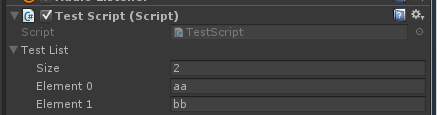
手动控制大小,不方便排序与删除
UnityEditorInternal有ReorderableList这个类,可以用于列表的排序
新建一个自定义扩展脚本
[CustomEditor(typeof(TestScript))]
public class TestScriptEditor : Editor
{
    TestScript testScript;
    private ReorderableList orderList;
    private void OnEnable()
    {
        testScript = target as TestScript;
        orderList = new ReorderableList(testScript.TestList, typeof(List<string>));
    }

    public override void OnInspectorGUI()
    {
        orderList.DoLayoutList();
    }
}
则新的序列化样子如下
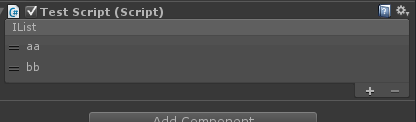
并且通过拖拽左边的标志可以进行排序
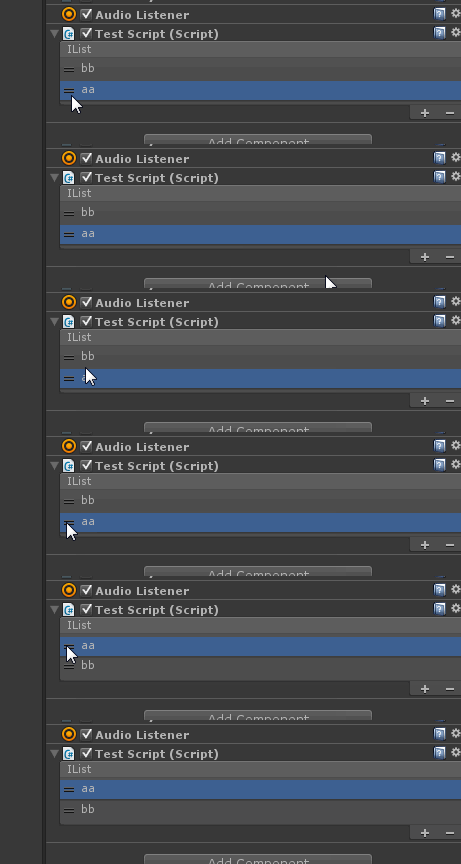
接下来再在OnEnable中实现ReorderableList中的一些方法,则可以自定义列表的增加、删除、排序等事件。
orderList.drawElementCallback = (Rect rect, int index, bool selected, bool focused) =>
{
    testScript.TestList[index] = EditorGUI.TextField(rect, testScript.TestList[index]);
};
orderList.onAddCallback = (ReorderableList list) =>
{
    testScript.TestList.Add("");
    Repaint();
};
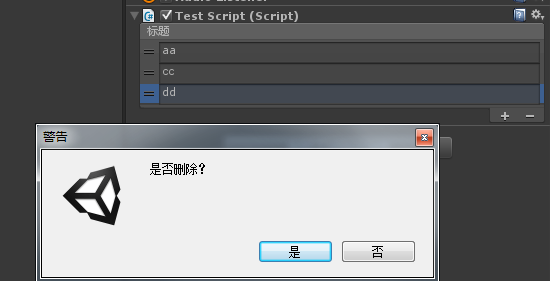
orderList.onRemoveCallback = (ReorderableList list) =>
{
    if (EditorUtility.DisplayDialog("警告", "是否删除?", "是", "否"))
    {
        ReorderableList.defaultBehaviours.DoRemoveButton(list);
        Repaint();
    }
};
orderList.drawHeaderCallback = (Rect rect) =>
{
    GUI.Label(rect, "标题");
};
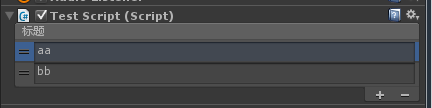
- drawHeaderCallback 绘制表头回调
- drawFooterCallback 绘制尾部回调
- drawElementCallback 绘制元素回调
- drawElementBackgroundCallback 绘制元素背景回调
- onReorderCallback 重新排序回调
- onSelectCallback 选中回调
- onAddCallback 添加按钮回调
- onAddDropdownCallback 添加下拉选项回调
- onRemoveCallback 移除元素回调
- onMouseUpCallback 鼠标抬起回调
- onCanRemoveCallback 是否显示可移除按钮回调
- onChangedCallback 列表改变回调
